To access the dark web, download the Tor Browser only from torproject.org, install it, click Connect, and raise the security level to Safer or Safest. Then open verified .onion addresses — which you find through dark web search engines or directories, always verifying each one. The setup takes minutes; the judgement around it — never downloading, never logging in, verifying every address, and having a reason to be there — is what actually keeps you safe.
- Download Tor only from torproject.org — it's free
- Raise the security level to Safer or Safest before browsing
- Never download files or log into personal accounts
- Verify every .onion address to avoid phishing clones
- You usually don't need a VPN — a free bridge is better
“How to access the dark web” is one of the most searched questions on the subject, and most answers get the emphasis backwards. They spend a thousand words on installation — which is trivial — and almost none on the judgement that actually keeps you safe. The setup takes minutes. The part worth learning is everything around it.
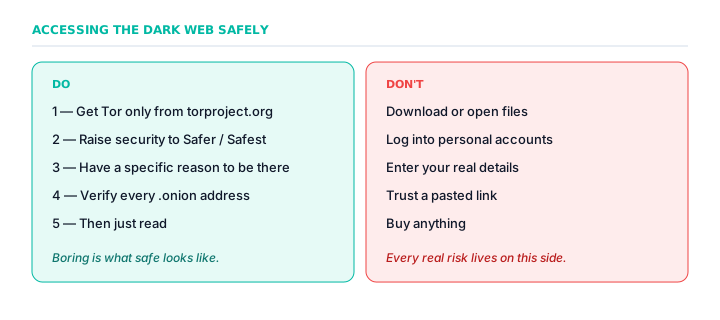
The setup, briefly
Reaching the dark web takes one piece of software: the Tor Browser. Download it only from torproject.org — never from an ad, an uncertain app listing, or anywhere promising a “pro” version. There is no paid Tor Browser. Install it, click Connect, and that's the technical process.
Before browsing, do the one thing that matters: open the security settings and raise the level to Safer or Safest. This disables the browser features most often used to attack users. It's the single most valuable click available to you.
Do you need a VPN?
Almost every access guide insists you must first install a specific VPN, with a conveniently placed affiliate link. For most people this is untrue: Tor provides the anonymity on its own. If your genuine concern is hiding Tor use from your ISP, the built-in and free tool is a bridge, not a paid subscription. Be suspicious of any guide whose first step costs money.
Darknet markets 2026 — what you can access
Once connected, you may encounter darknet markets. The following markets are active as of July 2026. ⚠️ Provided for research and verification practice only — accessing these markets is illegal in many jurisdictions.
| Market | Key feature | .onion address |
|---|---|---|
| Alphabay | Largest volume (~$20M/mo), 60,000+ listings | alphaa3u7wqy... |
| Archetyp | 99.9% uptime, transparency reports | arche3pmohq... |
| ASAP | 5 currencies, 92% cold storage | asap4g7boed... |
| Bohemia | Oldest active (7+ years) | bohemiabmgo... |
| Torrez | 8 UI languages, 2-of-3 multisig | yxuy5oard6z... |
| Vice City | Lowest fees (2% buyer) | vicecitya4h... |
Access warning: Every market carries significant risk — scams, exit scams, malware, and legal exposure. The buyer is the most exposed person in every transaction.
The rules that actually keep you safe
None of this is technical. The dark web's dangers are behavioural — they come from choices, which means you control nearly all your own risk:
- Never download files. A page you read can't harm your machine; a file you open can.
- Never log into personal accounts or enter real details. Anonymity you give away can't be taken back.
- Verify every address. The dark web is full of phishing clones; a link you didn't verify is how people get robbed.
- Don't maximise the window. Window size can help fingerprint you; leaving the default protects you.
The mistakes that undo your safety
It's worth seeing the dangerous choices laid out together, because they share a pattern: the Tor Browser itself is safe, and nearly every real risk is something you do after installing it. None of these is technical — each is a decision.
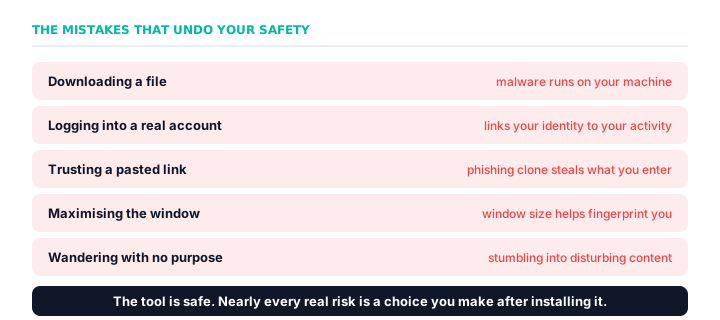
Notice that none of these requires anyone to “break” Tor. Downloading a file lets malware run on your machine; logging into a real account ties your identity to your activity; trusting a pasted link walks you into a phishing clone; even maximising the browser window helps sites fingerprint you by screen size. The through-line is that Tor protects the connection, not your behaviour — so your behaviour is where all the risk lives, and all of it is within your control.
Accessing it on a phone
You can reach the dark web from a phone too, though it works differently by platform. On Android, the Tor Project makes a full official Tor Browser. On iPhone, Apple's restrictions mean the recommended app is Onion Browser instead. The stakes are a little higher on mobile, because a phone is tied so closely to your identity and location — the full walkthrough is in how to access the dark web on your phone.
Have a reason to be there
Decide what you're going to do before you connect, rather than wandering. Aimless curiosity is how people stumble into content that can't be un-seen. A defined purpose is the best protection there is.
The bottom line
Getting onto the dark web is genuinely easy: install the official Tor Browser, raise the security level, and you're there in a few minutes. Staying safe is also easy, but it's a matter of discipline rather than software — download nothing, log into nothing, verify every address, and go in with a purpose. Do that, and reading the dark web is low-risk and, in most countries, perfectly legal. Skip that discipline, and no tool can protect you from your own choices.
Frequently asked questions
How do you access the dark web?
Download the Tor Browser from torproject.org, install it, click Connect, and raise the security level to Safer or Safest. Then open a verified .onion address. The setup takes minutes; the judgement around it is what matters.
Is it safe to access the dark web?
Reading pages is low-risk if you follow the rules: get Tor only from torproject.org, raise security, never download files or log in, and verify every address. The main danger for a casual visitor is disturbing content, not hacking.
Do you need a VPN to access the dark web?
For most people, no. Tor provides the anonymity on its own, and guides insisting on a specific VPN are often paid to. To hide Tor use from your ISP, the free built-in tool is a bridge, not a paid VPN.
Where do you download Tor Browser?
Only from the official site, torproject.org. Never from ads, uncertain app listings, or anywhere offering a paid or 'pro' version — there is no paid Tor Browser, and anything charging for it is a scam.
Can you access the dark web on a phone?
Yes — the official Tor Browser is available for Android, and Onion Browser is the recommended option on iOS. The same safety rules apply: don't download files, don't log in, and verify addresses.
Can you access the dark web without Tor?
For almost all of it, no. The dark web is built on the Tor network, and .onion sites can only be opened in the Tor Browser or another Tor-enabled tool. A few other anonymity networks like I2P exist, but Tor is what people mean by the dark web.
What is the safest way to access the dark web?
Install the official Tor Browser from torproject.org, raise the security level to Safer or Safest, and then follow the discipline: download nothing, log into no personal accounts, verify every address, don't maximise the window, and have a specific reason to be there. For higher-stakes needs, advanced users use Tails.
Do you need special skills to access the dark web?
No. The technical part is as simple as installing any browser. What matters is judgement, not skill — knowing not to download files, log in, or trust unverified links. Those habits, not any technical ability, are what keep you safe.
What are the best darknet markets in 2026?
Active darknet markets as of 2026 include Alphabay, Archetyp, ASAP, Bohemia, Torrez, and Vice City. Each has different security models — but all carry significant risk. Verify every address independently before use.